For MetaTrader 5
The trade panel with real AI chart analysis.
Set your risk once and trade in one click. The panel sizes every position so a stop-out costs exactly what you chose, and DB Chart AI reads your chart and draws the support and resistance that matter.
Free on demo accounts, with 3 AI analyses a day. A licence unlocks real accounts and 20 AI analyses a day.
Everything you need on the chart, nothing you don’t
-
DB Chart AI analysis
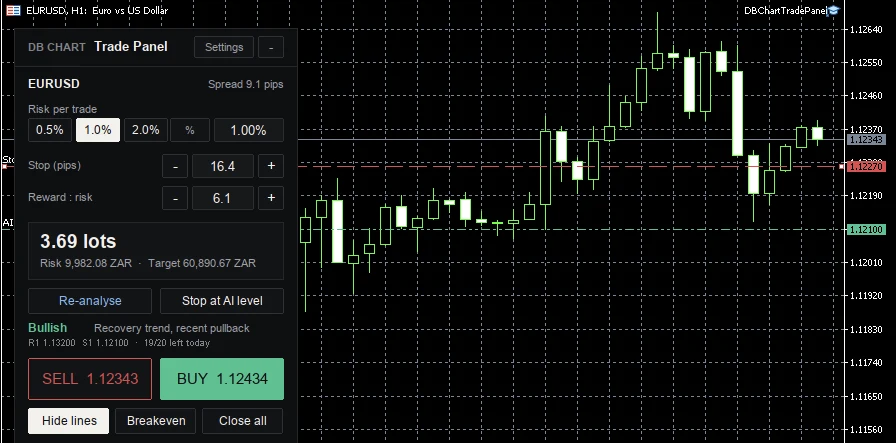
One tap reads the chart you are looking at: bias, a one-line reason, and support and resistance drawn as lines. Then “Stop at AI level” places your stop just beyond the nearest one.
-
Risk-based lot sizing
Choose 0.5%, 1%, 2% or a fixed amount. The panel works out the lot so a stop-out costs exactly that, and tells you when even the smallest lot would risk more.
-
Drag stop and target lines
Show the lines, drag them where you want, and the stop and reward-to-risk update. The matching BUY or SELL button stands out.
-
Breakeven, half at 1R, trailing
Move the stop to entry automatically, bank half the position at 1R, and trail the rest once the trade is safe.
-
Daily loss lock and trade limit
Set a daily loss limit and a maximum number of trades. When either is hit, the panel closes its trades and locks until tomorrow. Built for prop-firm rules.
-
Every market
Forex in pips; gold, indices and crypto in points, with a sensible starting stop from recent price movement. Settings are remembered per symbol.
The real thing
Straight from MetaTrader 5
Settings
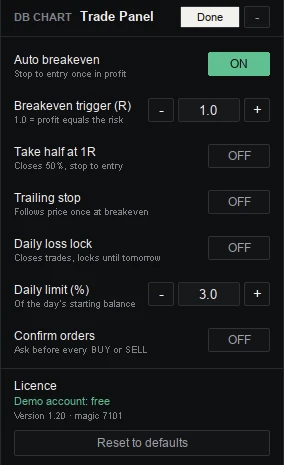
Set it up once, the way you trade.
Auto breakeven, take half at 1R, trailing stop, daily loss lock, max trades per day and order confirmation are all switches, saved between sessions.
Pricing
Try it on demo. Buy it when it earns its place.
The full panel works free on any demo account, so you can test every feature before you pay.
Lifetime licence
$49
Founder launch: 40% off with code FOUNDER (about $29). One-time payment; your local currency and any VAT are shown at checkout.
- Real (live) accounts unlocked
- Use on 2 MT5 accounts
- 20 DB Chart AI analyses a day
- Free updates
Secure checkout by FastSpring. Your key arrives by email straight after payment.
Install in two minutes
Downloaded. Don’t open the file: it only runs inside MetaTrader 5. Move it into MT5 with step 1 below.
- Download the panel above. It isn’t an app, so don’t double-click it. In MT5, open File › Open Data Folder › MQL5 › Experts and drag the file into that folder. Right-click Expert Advisors in the Navigator and choose Refresh.
- In Tools › Options › Expert Advisors, tick Allow algorithmic trading and Allow WebRequest for listed URL, then add
https://dbchart-api.jasonc-jpg.workers.dev - Drag DBChartTradePanel onto a chart and click OK. On a real account, paste your licence key into Inputs › Licence key first.
Questions
- Does it trade for me?
- No. It is a manual trading tool: it places, sizes and manages the trades you choose. It does not open trades on its own.
- Which brokers does it work with?
- Any broker that offers MetaTrader 5 on Windows or Mac. It does not run on the MT5 phone apps, which don’t support add-ons.
- It says “Can’t trade EURUSD here”?
- Many brokers trade a version of each symbol with a suffix, such as EURUSD.z or EURUSDm. In Market Watch, right-click › Symbols, show that version, open its chart and put the panel there.
- What does the AI analysis do?
- It sends a picture of the chart to DB Chart, which returns a bias, a one-line reason and key support and resistance levels. It is educational context, not a signal or a prediction.
- Can I move my licence to a new account?
- Yes. Each key works on 2 accounts; contact support to free a slot.
- Refunds?
- Test it free on demo first. If something isn’t working for you after buying, contact support within 14 days.
The DB Chart Trade Panel is a trading tool. It does not provide financial, investment or trading advice, and makes no claim or prediction about future prices or returns. Trading leveraged products carries a high risk of losing money. Always use risk you can afford to lose.